

 Award
Award Same innovation type
Training speakers
FPSE
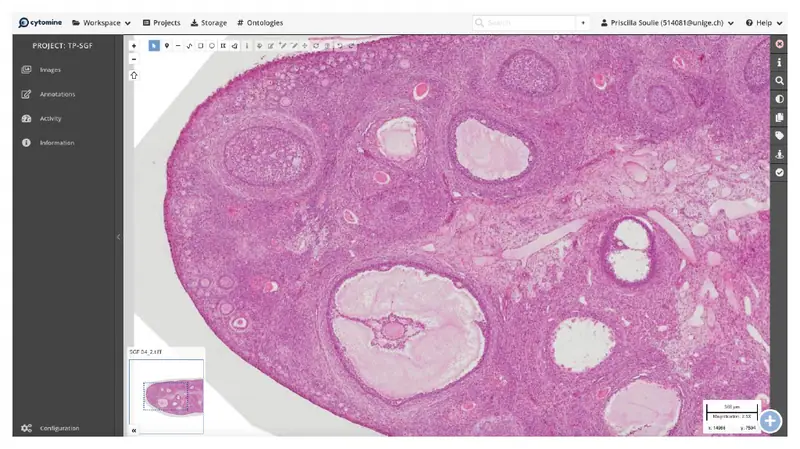
During face-to-face practical work, students use Zoom to share their screen with the teacher and their peers. This enables them to annotate histological sections together, ask questions live and take part in interactive challenges, promoting a collaborative learning experience.


Until 2017, the 90 students in the histology practical work (TP) observed histological sections under the microscope and could ask the teacher’s opinion or not. For material reasons (loss or deterioration of the sections), logistical reasons (ever-increasing number of students) and pedagogical reasons (coherence between the teaching provided and the final evaluation, empowerment and responsibility of the students), the format of the practical work has been modified and now proposes the use of a site making histological sections available online.
During the pandemic, the teaching team had to switch their teaching to Zoom. This experience allowed them to experiment with Zoom’s features and to discover that, even in a classroom setting, some of these features made a significant contribution to learning.
According to the principle of the flipped classroom, students prepare 5 to 7 histological sections in advance. These are proposed on the Moodle space of the course, classified by TP session. They are presented online thanks to the virtual microscopy site Cytomine. Thanks to this platform, the students can zoom, annotate the slides and point out the regions which pose a problem to them. During the practical sessions, students are divided into groups (13 to 15 per group) with 1 or 2 tutors. Previously, they looked at the virtual slides on their computer, exchanged ideas with their neighbour and asked questions to the teacher who answered them individually.
From now on, thanks to the experience of the remote practical courses during the pandemic, each student and the supervisor of the practical course will be in the room and will connect to Zoom. The supervisor or the students can share their screen so that everyone has the same section in front of them. By activating the “annotate” function, the supervisor can ask the students to point out the structures that have caused them problems on the section or that raise questions live. This allows the teacher to answer all the questions for everyone and not individually. He/she can also propose quizzes during the lesson, such as “point out all the caliciform cells on this section”. The students can then annotate the section live and see the answers of the other students. The teacher can validate or invalidate the scores and comment on right or wrong answers. He/she can also issue challenges such as “the first person to find a cell of this type shares his/her screen”. Each student searches on his/her own and the first one who has an answer to propose shares his/her own screen.
On their Cytomine space, students can make notes on each of the sections to return to later and confirm their learning. Indeed, each pointing on Cytomine presents the coordinates of the location examined, allowing students to easily find it on their own space.
At the end of the course, a student presents orally one of the histological sections previously discussed. The student develops his/her ability to construct and verbalise a logical reasoning in order to arrive at a diagnosis. These skills are required in a good clinician or scientist. In addition, this presentation format prepares them for the final evaluation of the course which takes the form of an oral presentation.
The teaching team purchased the Cytomine platform but was responsible for digitising the proposed sections. It regularly updates, adds and deletes sections. This web platform allows the main administrator to have access to all the annotations made by everyone. It could thus be envisaged to use the tool for evaluation purposes.
Exceptionally, the Zoom format may allow students who are unable to attend the course remotely. However, this is not recommended because even if the student can hear the teacher well at a distance, he/she has more difficulty hearing the others, can participate and annotate but does not benefit from the stimulating atmosphere created within the group.
The new format of practical work changes the role of the teacher. He/she is no longer only present to answer questions and remind the students of important points, but must also facilitate the session in an interactive way. This requires more pedagogical work, but, according to the general opinion of the teachers, is also more rewarding.
It also allows for greater awareness of the students’ progress and their understanding or lack of understanding of the concepts. Previously, the tutor did not really have an overview of each student’s progress as each student progressed at their own pace and only asked questions when they encountered a problem. By using the screen annotation features offered by zoom to ask quizzes, the teaching team became aware that even basic concepts could be confusing for some students. These findings allow them to reiterate key concepts that were not understood.
As the annotations are anonymous, but recognisable by shapes or colours, students can easily take the quizzes. However, they receive specific feedback from the teacher, who can comment on each of the annotations made. They can compare their annotations with those of others and learn from their peers’ answers.
Another advantage of this format is that it is not (or only slightly) dependent on the number of students. Thus, if necessary (e.g. absence of a teacher) it is possible to increase the size of the groups without affecting interactivity or the quality of learning.
The pedagogical benefit of Zoom is not linked to this software in particular, but to the functionalities associated with it, i.e. screen sharing and above all the possibility for each participant to annotate the screen. Zoom is the software provided by the university, but other software could fulfil the same function.
The pedagogical contribution of such an approach could benefit any type of teaching requiring the analysis of even complex structures/images and for which learners would benefit from the precision of the annotation tool and the interactivity of exchanges between peers and with the teacher.
Student feedback
“Presenting a cup in front of the group and then in front of the half-volley allows you to gain self-confidence and familiarize yourself with how to structure a concise oral presentation.”
“Very clear TP file; By learning the notebook in advance, I was quite comfortable with histological sections. I like the shape of the practical works which remain quite interactive. »
“Very good to do the histology in small groups and to pass designated people orally even if it is a little stressful at first, it is a good training. ”
“Even if preparing the cups takes us time, we learn very well this way! And the “threat” of oral presentations forces us to do our job properly. »
“I found this face-to-face format with zoom very educational. All students could follow and understand each other’s questions without problems. In addition, this format allowed to have a very interactive course with the students. »
“I find the TP format more interactive as we do now. I am in favour of the continuity (or improvement) of this type of system”
“The zoom-to-face mix is great for sharing and watching the same thing. However, in order not to waste time, students should be ready to share and annotate without having to explain each time, especially those who have never used their zoom and must approve many permissions…”
“Quizzes are fun and informative”
“The TP guide helps a lot because the diagrams strongly resemble the structures found on cytomine. The zoom makes it easy to interact.”
“Strong point: in a small group, we can share our screen on zoom, and ask the teacher specific questions about the structures.”
“Very good idea to share your screen by zoom to show the concepts not understood, allows you to visualize better. ”
Award Same innovation type

Same innovation type
Same innovation type